Dune Awakening Server Transfer Guide: How to Keep Your Base
Before a Dune Awakening server transfer, back up your base, or it stays on the old world for good. Funcom puts it bluntly in the 1.2.40.0 patch notes: "If you transfer without backing up your base(s), they will be left behind!" According to those patch notes, you got one transfer token per account, and it only replenishes seven days after you use it. Since Update 1.5, however, Funcom says official server characters "can be played on any official server" and no longer mentions a token, so whether the token limit still applies isn't officially confirmed. According to 1.2.40.0, the transfer can only be started from the Hagga Basin.
What matters is the order, not the speed. This guide walks through every step of a Dune Awakening server transfer, plus the one-way decisions you can't take back.
🔄 What actually comes with you
A character transfer in Dune Awakening isn't a server merge. Your character moves, and only with what you packed beforehand. According to the patch notes, these come along:
- inventory and bank contents
- your Solaris balance
- the contents of the Base Reconstruction Tool (your backed-up bases)
- the contents of the Vehicle Backup Tool (your backed-up vehicles)
Everything still standing in the world at transfer time stays behind: walls, generators, windtraps, chests, a parked vehicle. None of it lands in a mailbox, and nothing gets refunded.
Important for the endgame: according to Funcom's help page, the Base Reconstruction Tool only works in the Hagga Basin, both for backing up and for rebuilding. Anything you built in the Deep Desert is out of luck. How short-lived structures are there anyway is covered in our Deep Desert guide.
✅ Checklist: Dune Awakening server transfer in the right order
This is where players lose their bases. Not because they do a step wrong, but because they do it too late. Work through the list top to bottom:
- Pick your target server before you tear anything down. Check space and population in the server browser. Moving to the next dying world puts you right back in the same spot a few months later.
- Get a Base Reconstruction Tool. If you don't have one, Funcom says you can get it through the "Claim Rewards" menu, together with the Vehicle Backup Tool.
- Back up your bases. The tool holds up to three bases. If you have more, you have to decide which ones to leave. According to the official guide, the contents get saved too, and you don't need to worry about power inside the backup.
- Put vehicles into the Vehicle Backup Tool. Anything too big, take apart with the Welding Torch and store the parts in your bank or base storage.
- Empty and remove cargo containers. The Base Reconstruction Tool explicitly does not save assembled vehicles or the cargo containers of the Carrier Ornithopter; they fall to the ground. Cargo inside a vehicle counts as lost during the backup.
- Move everything valuable into your inventory and bank. Rule of thumb: if it isn't in one of the two tools, your inventory or your bank, it doesn't come along.
- Sort out permissions. Extra build and access permissions you handed out aren't saved. You'll have to set them again on the new world.
- Pause your crafting queue. Sounds trivial, but it prevents a known bug.
- Return to the Hagga Basin. The transfer can only be started from there.
- Start the transfer from the server browser or the system menu. Before you confirm, the game shows a list of items you'll lose. Read it. It's your last warning.
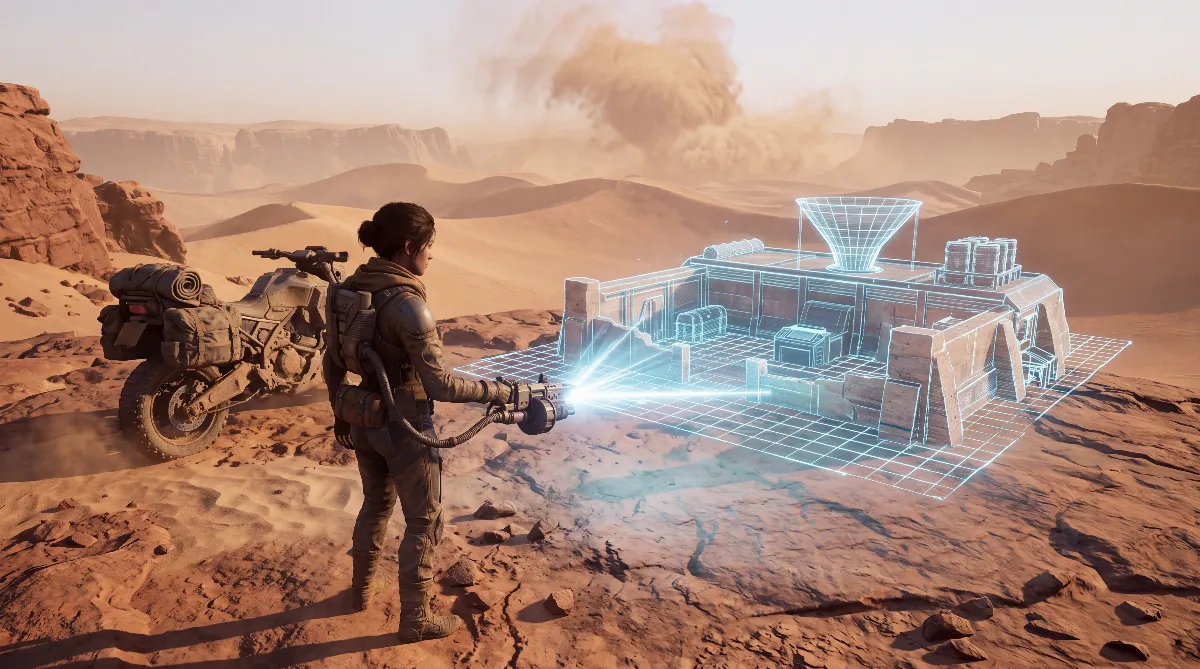
- Rebuild your base on the new world. According to the patch notes, your character spawns at Griffin's Reach in the Hagga Basin. Use "Place Blueprint" to find a spot, line the hologram up with the terrain and set the base down.
One detail many people miss: once you've backed up and placed the same base, Funcom applies a seven-day cooldown before you can pack it up again. Since Update 1.5 there's an exception: in the southern Hagga Basin the tool no longer has a cooldown. Everywhere else, you can't move, decide you hate the spot and move again the next day. Pick the location as carefully as the first time. Our base building guide has the criteria.
📦 What works and what doesn't
| Action | Possible? | Note |
|---|---|---|
| Official server → another official server | Yes | Per 1.2.40.0 one token, then a 7-day wait; no longer mentioned in the 1.5 notes |
| Official server → private or self-hosted server | Yes | Funcom: "but not back again" |
| Private server → official server | No | To protect the official worlds |
| Private server → another private or self-hosted server | Yes | Since Update 1.5, but never back to official servers |
| Take your base along | Yes, up to 3 | Only with the Base Reconstruction Tool, only in the Hagga Basin |
| Take a Deep Desert base along | No | The tool only works in the Hagga Basin |
| Take an assembled vehicle along | Partly | Vehicle Backup Tool; take big ones apart first |
| Carrier Ornithopter cargo containers | No | Count as a vehicle and fall to the ground |
| Undo the transfer | Partly | Between official servers, per 1.2.40.0 only with a new token after 7 days; from a private or self-hosted server never back to official servers |
| Keep your character name | Usually | If it's taken, you have to pick a new one |
⚠️ One-way decisions in a Dune Awakening server transfer
Three decisions are final. First, the transfer itself: per 1.2.40.0, going back only worked with another token, seven days later at the earliest. Funcom hasn't explicitly confirmed whether that still applies since Update 1.5, but the base you left behind isn't backed up either way.
Second, moving to a private server: a character from an official server can move to a private or self-hosted server, "but not back again, to ensure the integrity of official servers". The technical side is covered in our guide to hosting your own server.
Third, whatever you leave behind: a forgotten fourth base isn't a project you'll pick up later. It's gone.
A special case affected everyone who had to change servers because their world was shut down. On May 26, 2026, Funcom closed around 169 low-population worlds in Asia, Europe, North America, Oceania and South America, announced in the news post "Server Migrations – Live today!". Affected players had to move and received both backup tools through "Claim Rewards". Anyone who reacted too late back then knows how seriously that "left behind" line is meant.
🏜️ Known bugs after a server transfer
If something's off after the move, it's often not your fault. Funcom's known issues list on the Steam forum (as of May 19, 2026) included several transfer problems:
- JQ2 error message when trying to transfer the character.
- "character data" error during the transfer. For both, the official advice is simply to try again later.
- Stuck crafting queue: your personal crafting queue stays frozen after the transfer if you didn't pause it first. Funcom's fix: after logging back in, pause the queue once and start it again.
- Fixed since Update 1.5: Base Reconstruction Tool pieces ending up in the wrong positions (Hotfix 1.5.3.3), a backed-up base's origin marker being offset after a server restart and characters stuck after cross-realm transfers on private servers (both 1.5.3.4), and the Q73 error during character transfers when a Solido Replicator held a custom-named blueprint (1.5.3.5).
Progress, attributes and your path from the specializations guide are tied to the character and move with you, and so does your gear, as long as it's in your inventory or bank. Your build keeps working unchanged. What doesn't move is the social side: guild, neighbors, trade partners and the situation in the Landsraad are completely different on the new world.
💡 FAQ about the Dune Awakening server transfer
How often can I change servers?
According to the 1.2.40.0 patch notes, you start with one transfer token per account, and it replenishes automatically seven days after you use it, so one move per week. The Update 1.5 notes no longer mention a token and say official server characters can be played on any official server. Whether the weekly limit still applies isn't officially confirmed, so check the character menu.
Does a server transfer cost money?
The 1.2.40.0 patch notes describe a token that replenishes by itself and don't mention buying one, and the Update 1.5 notes don't mention any cost either. Whether Funcom will offer extra tokens later isn't confirmed.
What happens to my base if I don't back it up?
It stays on the old server with everything inside. By the time you get back there, decay or another player may have gotten to it, and from a private server you can't go back at all.
Can I move from a private server back to an official server?
No. Funcom only allows the move from official servers to private or self-hosted worlds in one direction, to protect the integrity of the official servers.
Do I have to be in the Hagga Basin for the transfer?
Yes. Backing up and rebuilding the base and starting the transfer all only work in the Hagga Basin. Afterwards your character spawns at Griffin's Reach on the new world.
Does this matter in single player?
Only indirectly. Single player characters stay in single player mode and can't be transferred. If you want to play alone on your own world, you can take a character from an official server to a private or self-hosted server, but not back. More in our single player guide.
As of October 11, 2026 (Update 1.5, latest hotfix 1.5.3.7 from October 9, 2026). Based on the official Funcom patch notes 1.2.40.0, Funcom's help page on the Base Reconstruction Tool, the announcement of the console and single player launch, the news post "Server Migrations – Live today!" from May 26, 2026, the known issues list on the Steam forum and the Update 1.5 patch notes from September 17, 2026 including the hotfix notes up to 1.5.3.7. Funcom can change these rules with any patch.