Dune Awakening Move Base Guide: Base Reconstruction Tool, Cooldown and What Comes Along
- 🧰 Two tools, two jobs
- 🚚 Dune Awakening move base: step by step
- 📦 What comes along and what stays behind
- ⏳ "Backup not possible": the seven-day cooldown
- ⚠️ When the backup or placement fails
- 🧩 Solido Replicator: copy instead of move
- ♻️ Recycle a base instead of moving it
- 💡 FAQ about the Dune Awakening move base process
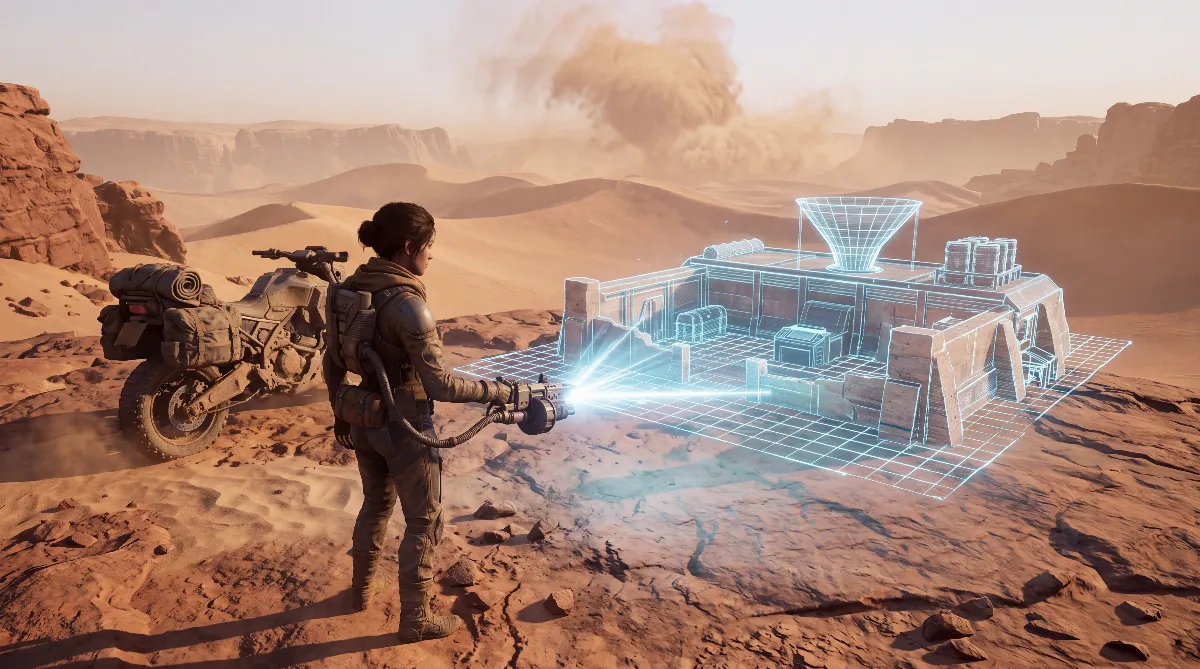
The Dune Awakening move base process runs through the Base Reconstruction Tool: it packs up every building including the contents of your containers and drops it all at a new spot. It only works in Hagga Basin, and after each move a one-week cooldown kicks in, except in Hagga Basin South.
This guide walks through the process step by step, covers what comes along and what doesn't, why the backup is sometimes refused and when the Solido Replicator is the better choice. If you want to move your character to another server, see the server transfer guide. This one is about moving within the same world.
🧰 Two tools, two jobs
Dune Awakening has two tools that both handle bases but work completely differently. Recipes come from the item database dune.gaming.tools, which reads its values from the game files.
| Base Reconstruction Tool | Solido Replicator | |
|---|---|---|
| Recipe | 5 Copper Ingot, 5 s | 20 Salvaged Metal, 15 s |
| Station | Fabricator or Survival Fabricator | Fabricator or Survival Fabricator |
| What it stores | All buildings with contents | Only the blueprint |
| Old building | Disappears from the world immediately | Stays in place |
| Rebuilding | Appears fully built at once | Piece by piece with the Construction Tool |
| Where it works | Hagga Basin only | Also the Deep Desert, according to the community |
You unlock both through research, but the sources disagree on where. dune.gaming.tools lists both tools in the early salvage section of the building research tree, while the community wiki awakening.wiki places the Base Reconstruction Tool in the Iron tier of the Research Menu. Check the research menu in game if in doubt.
Since Update 1.5, the Hagga Basin South journey "A New Beginning" also walks you through the Base Reconstruction Tool, according to the patch notes.
🚚 Dune Awakening move base: step by step
The process follows Funcom's official description from the feature blog of November 2025 and the patch notes for 1.2.30.0, which brought the tool into the game in December 2025.
- Craft the tool: 5 Copper Ingot at the Fabricator. According to Funcom's help page, you don't lose the tool on death, not even to the sandworm.
- Get your vehicles out: assembled vehicles aren't backed up. A Sandbike, Scout Ornithopter or Treadwheel can be stored with the Vehicle Backup Tool (6 Copper Ingot, 2 Particle Capacitor). According to the community wiki it only takes one-person vehicles, and it doesn't say how many vehicles one tool holds, so plan on one tool per vehicle if in doubt. Bigger vehicles you take apart, as Funcom suggests, and store the parts in the bank or a container.
- Check what sits outside: anything not placed directly on or in the building stays behind. Before you confirm, the game tells you how many placeables will be left behind, according to Funcom. Read that number.
- Back up the base: equip the tool, aim at the building and confirm the backup. Everything vanishes from the world immediately.
- Find a new spot: at the destination, pick the stored entry, line up the hologram and place it. According to the patch notes, you can rotate it and adjust height, width and depth.
- Done: everything appears fully built, including all contents. No gathering or rebuilding needed.
The Vermillius Gap journey "Moving On" revolves around the move. According to dune.gaming.tools, its step "Place your backed up base using the Base Reconstruction Tool" counts since Update 1.5 as soon as you place the base anywhere outside Hagga Basin South, as the patch notes say.
The community wiki lists different steps for the same journey, including the Advanced Sub-Fief Console and abandoning your bases in Hagga Basin South. You cross the gap on the Sandbike.
📦 What comes along and what stays behind
Funcom is clear here: the tool stores everything inside the Sub-Fief, explicitly including the Sub-Fief Console, decorations, storage containers with their contents, water cisterns, blood purifiers and crafting benches. That settles the question of what happens to the loot in your crates. It moves with you.
| Comes along | Stays behind |
|---|---|
| Building pieces, foundations, Sub-Fief Console | Assembled vehicles |
| Containers and storage with contents | Objects outside the building |
| Water cisterns and blood purifiers with contents | Extra permissions you handed out |
| Fabricators, refineries, decorations | Unfinished, partly assembled vehicles |
While the Sub-Fief sits in the tool, it uses no power, according to the community wiki. Up to three bases fit in at once, as the official 1.2.30.0 patch notes state.
⏳ "Backup not possible": the seven-day cooldown
Try to pack everything up again two days after your last move and you'll fail. Funcom's 1.2.30.0 patch notes set a cooldown of one week per Sub-Fief. According to the community wiki, it starts as soon as the Sub-Fief is placed, whether with the Construction Tool or the Base Reconstruction Tool. The reason given in the feature blog: nobody should be able to dodge upkeep costs this way.
Since Update 1.5 there's an important exception. The 1.5.3.0 patch notes say: "Cooldown for using the base reconstruction tool is now set to 0 in Hagga Basin South." In practice that means you can test, move and repack in the starting area as often as you like. North of it, take the location seriously, because once you place the base you're stuck there for a week. What to look for in a spot is in the base building guide.
⚠️ When the backup or placement fails
Besides the cooldown, there are several reasons the tool refuses. Funcom lists them on its help page for the Base Reconstruction Tool (funcom.helpshift.com).
- Missing foundation: according to Funcom, the Sub-Fief Console can't sit on bare ground, it needs a foundation. If the tool refuses because of the foundation, put a foundation under the console first.
- Pieces outside the border: anything attached to the building has to sit inside the Sub-Fief border, otherwise it blocks the backup.
- Not the owner: only the owner can pack up. The tool description in the game also refers to the owner of a Sub-Fief.
- Wrong area: backing up and placing only work in Hagga Basin, according to the patch notes. Neither works in the Deep Desert.
- Advanced console in the south: a Sub-Fief with an Advanced Sub-Fief Console can't be placed in Hagga Basin South, according to the 1.2.30.0 patch notes and Funcom's help page.
- Space taken: according to Funcom, the Sub-Fief can't overlap other claims or no-build zones. If another player stands in the target area or the hologram overlaps a vehicle, placement is blocked too.
About terrain: if the hologram sits too high, the game automatically extends the foundations downward by up to 5 units, according to the patch notes. These extra foundations are marked, and you get no resources back for them when you tear them down. Funcom also warns that a very complex building may only fit at its original spot. For that case there's the "Snap to origin" option, which locks everything back into its old place.
🧩 Solido Replicator: copy instead of move
The Solido Replicator is the tool when you don't want to move your base but rebuild it. Its in-game description: "Point this tool at an existing base to store a blueprint copy." You then place a projection at another spot and build it again with the Construction Tool. The original stays, and you pay for the materials again.
According to the community wiki, the replicator only copies the building, not inventories, circuits, permissions, names or color patterns. Disconnected sections are missing from the copy, and the device is used up once the copy is fully placed. Players mainly use it for Deep Desert bases, where the Base Reconstruction Tool doesn't work, according to the wiki. What things look like there is in the Deep Desert guide.
Since Update 1.5 there's a cap on how many Solido Replicators you can store: 20 in your inventory, 10 per base storage, 20 in the bank and 10 per vehicle. Anything above that drops to the ground, according to the patch notes.
♻️ Recycle a base instead of moving it
If you don't need a Sub-Fief anymore, you can recycle it since patch 1.3.15.0. Funcom calls the feature Base Recycling. According to the patch notes, it "refunds 100% of materials and items stored in a base blueprint". To do it, you back up the base and hold the X key; the notes don't name a controller binding. After that you have to empty the Reserve before you can recycle the next one.
💡 FAQ about the Dune Awakening move base process
Can I move my base on PS5?
Yes. The tool is the same as on PC, and Funcom names no console restriction. For recycling, the patch notes only mention the X key and give no controller binding.
Why does it say I can't back up for seven days?
Because every Sub-Fief has a one-week cooldown after placement. Since Update 1.5, the lock no longer applies in Hagga Basin South.
What happens to the loot in my containers?
It moves with you. According to Funcom, storage containers, water cisterns and blood purifiers are backed up with their contents.
Can I back up my base in single-player?
Funcom doesn't list a special rule for the tool in single-player mode. How fast buildings decay solo is something you set in the single-player settings.
Can I take my base into the Deep Desert?
No. Backing up and placing only work in Hagga Basin. For the Deep Desert, the Solido Replicator with a rebuild is what's left.
How many bases fit in the tool?
Up to three. If you own more, you have to decide which one stays out.
Checked as of October 2026 against Dune Awakening Update 1.5 (live since September 17, 2026), latest Hotfix 1.5.3.7 (October 9, 2026). Hotfix 1.5.3.3 fixed a bug where the Base Reconstruction Tool placed some pieces incorrectly, Hotfix 1.5.3.4 an offset origin marker after server restarts.
Sources: Funcom's feature blog on the Base Reconstruction Tool (November 2025), official patch notes 1.2.30.0, 1.3.15.0 and Update 1.5 with hotfixes on duneawakening.com. Recipes from the database dune.gaming.tools (game files). Foundation, border, owner and placement rules from Funcom's help page on the Base Reconstruction Tool (funcom.helpshift.com).
Cooldown start, power use in the tool, the research tier, the Vehicle Backup Tool limits, the wiki's journey steps and Solido contents come from the community wiki awakening.wiki and aren't confirmed by Funcom. All English guides are on the Dune Awakening hub.