StarRupture Ruptures: The Complete Survival Guide (2026)
- 🌋 What a Rupture Actually Is
- ⏱️ The Five-Second Rule: Get Under a Roof in Time
- 🛡️ Defending the Base Against the Waves
- ⚡ Base Core and Power Have to Hold
- 💎 The Payoff: the Window After StarRupture Ruptures
- 🗓️ Which Patch This Guide Is Based On
- 🧰 The Rupture Checklist Before Every Countdown
- 📊 Surviving StarRupture Ruptures at a Glance
- ❓ FAQ about StarRupture Ruptures
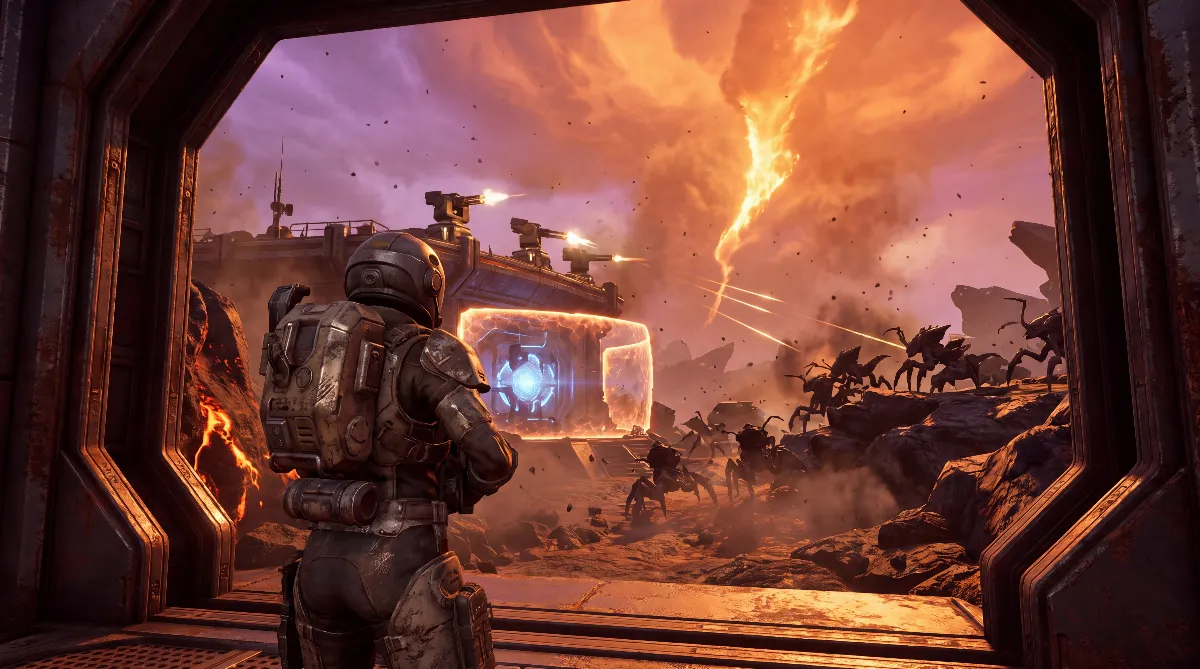
StarRupture Ruptures are the disaster the game is named after: the unstable star erupts periodically and sends a firestorm, the Fire Wave, across Arcadia-7. When the countdown in the HUD hits zero, you have about five seconds to be inside a sealed building, or the heat kills you instantly. At the same time, enemy waves attack your base.
This guide explains how to survive both threats, the deadly storm and the waves, and how to turn the chaos afterwards to your advantage.
🌋 What a Rupture Actually Is
The star above Arcadia-7 is unstable. At regular intervals, a Rupture discharges as a glowing firestorm, called the Fire Wave in the game and in the official patch notes. It damages everything that stands unprotected outside.
A “Frost Wave” has so far only appeared as a bullet point on the Early Access roadmap for version 1.0, with no explanation and no date. An icy Rupture isn't confirmed in the current game.
The good news: you get a warning. The wave warning runs as a countdown at the top of the HUD. Once it appears, you have limited time to prepare, and you shouldn't waste it farming; use it to get to shelter. If you spend a lot of time out in the field, an automatic warning system that reports the Rupture away from base is worth building.
⏱️ The Five-Second Rule: Get Under a Roof in Time
This is the mistake that kills new players most often. When the countdown hits zero, you only have about five seconds to be standing in a sealed building: your Lander or a Habitat with an Airlock. Get caught outside and the heat kills you almost instantly.
That's why you build your Habitat close to the Base Core, so the path is short. For emergencies on the road, always carry a Meteor Heart and around 100 Basic Building Material. With those, you can put up a makeshift bunker if you can't make it back to base. The basics are in our StarRupture base building guide.
🛡️ Defending the Base Against the Waves
Alongside the storm, waves of Vermin roll in. Your first line of defense is automatic turrets. Placement matters more than quantity: concentrate the turrets on the Base Core, the Habitat and the Solar Generators, not spread across every remote extractor.
Build a wall around the red edge of the Base Core and set up six to ten basic turrets with overlapping fields of fire. That creates kill zones at choke points and fends off a wave in about half a minute. Important: don't seal yourself in completely. You need escape routes and room to dodge in a fight.
Against Flingers, the ranged enemies, turrets are inaccurate at a distance. Lure them closer so the turrets hit. Keep an assault rifle ready for hordes and explosives for clusters, and kite enemies into your turrets' line of fire. Which weapon fits when is covered in our StarRupture weapons guide.
Plan your defense with an eye on what's coming: basic turrets handle the early waves easily, but from the third wave on, the spawn rate rises noticeably. Upgrade to heavier turrets in time and stock up on ammo before the next wave rolls in. Producing more mid-fight is too late.
⚡ Base Core and Power Have to Hold
A Rupture damages everything outside protected areas. According to the game database starrupture.th.gl, that protection comes from the Base Core: it shields your base from the Fire Wave as long as its capacity isn't exceeded. If the base gets too big, the protection fails. More capacity comes from the Base Core Amplifiers of the Moon Energy Corporation. Before every warning, also check that your power supply covers turrets and production.
If the base falls anyway, infection nodes appear on it. Shoot them quickly to regain control. And keep an eye on the Base Core: in StarRupture, it can take damage from distant Flingers even when no enemy seems close. The power side behind all this is explained in our automation and power guide.
💎 The Payoff: the Window After StarRupture Ruptures
This is where surviving turns into profiting. The firestorm briefly wipes out the local alien population; right after a Rupture, the area is as safe as it ever gets. That's when exploring pays off most.
There's also a bonus many players miss: rare resources like Ignitium only appear while the planet cools down after the storm. Head out right after the Rupture and you collect material that's otherwise unavailable, with hardly any resistance. The disaster becomes your best farming window. Once you've internalized this rhythm, you plan exploration trips around the Ruptures instead of at random. Suitable routes start from the best base locations in StarRupture.
🗓️ Which Patch This Guide Is Based On
StarRupture is in Early Access, so the version matters. The current one is Update 2 “Quality of Life”, released on September 2, 2026. Creepy Jar announced it on August 28, 2026, explicitly without a date at the time. The developer gives no version number for Update 2. According to the Steam news feed, Hotfixes 0.3.2 (September 4), 0.3.3 (September 14), 0.3.4 (September 17) and 0.3.5 (October 5, 2026) followed; the previous numbered patch was Hotfix 0.2.8 from June 17, 2026.
For this guide, that changes nothing: Update 2 doesn't touch Ruptures, waves or turret defense. According to the announcement, the focus is on factory building. Everything above about the five-second rule, the waves and the window afterwards still applies.
What still helps your preparation: the reworked Drone Roundabout, search bars for buildings and storages, copying settings with Ctrl + C and Ctrl + V, and “Add Pillars” with adjustable pillar height. On top of that, a new recipe balance requires fewer buildings for the same production.
Content-wise, the core of the game still comes from Update 1 from April 9, 2026. The full list of changes is in our overview of StarRupture Update 2.
🧰 The Rupture Checklist Before Every Countdown
When the wave warning appears, there's no time left to think. These points need to be done beforehand, not during the countdown.
- Path to shelter under five seconds. Time it once. If it's too long, build a Habitat closer to the Base Core.
- Meteor Heart and around 100 Basic Building Material in your inventory. That's your emergency bunker for anything outside the base.
- Base Core not over capacity. If its capacity is exceeded, it stops protecting.
- Power reserve in place. Check your balance before the warning, not after.
- Ammo and healing restocked. Producing more mid-fight doesn't work.
- Turrets repaired. Damaged turrets from the last wave won't hold against the next.
📊 Surviving StarRupture Ruptures at a Glance
| Phase | What to do |
|---|---|
| Wave warning appears | stop farming, head for shelter |
| Countdown running | ready ammo, healing and repairs |
| Countdown at zero | within ~5 sec. into the Lander or a Habitat |
| Waves attack | turrets at the Base Core, lure Flingers closer |
| Right after | explore, collect Ignitium, repair damage |
| Caught on the road | Meteor Heart plus 100 Basic Building Material: emergency bunker |
| Patch | Update 2 “Quality of Life” from Sep 2, 2026 plus Hotfix 0.3.5 from Oct 5, 2026, content from Update 1 |
❓ FAQ about StarRupture Ruptures
How much time do I have when the countdown hits zero?
Only about five seconds. In that time, you need to be inside a sealed building like the Lander or a Habitat with an Airlock, or the heat kills you.
Can I survive a Rupture outside?
Not without shelter. If you're too far away, use a Meteor Heart and around 100 Basic Building Material to put up a makeshift bunker instead of risking the way back.
How many turrets do I need for a wave?
According to community guides, six to ten basic turrets around the Base Core are enough for the early waves. Set them up with overlapping fields of fire and concentrate them on the Base Core and Habitat.
Why is exploring after a Rupture worth it?
Because the storm briefly clears out the aliens, and rare materials like Ignitium only appear while the planet cools. It's the safest and most rewarding window.
Are there icy Ruptures besides the firestorm?
Not at the moment. The patch notes only know the Fire Wave. A “Frost Wave” is only a bullet point on the roadmap for version 1.0, with no explanation and no date. How it's supposed to work is unknown.
Which version does this guide apply to?
Update 2 “Quality of Life” from September 2, 2026 with Hotfix 0.3.5 from October 5, 2026, the current version. Content-wise, the core comes from Update 1 from April 9, 2026. Hotfixes 0.3.2 to 0.3.5 don't list any changes to Ruptures or waves in their patch notes either.
Does Update 2 change the Ruptures?
No. The release patch notes from September 2, 2026 list improvements to factory building, controls and recipe balance, not to the disaster itself. The five-second rule and the waves are unchanged.
As of: October 2026, Early Access. Live is Update 2 “Quality of Life” from September 2, 2026 with Hotfix 0.3.5 from October 5, 2026; the content core comes from Update 1 from April 9, 2026.
Official sources: the patch notes for Hotfix 0.2.8 from June 17, 2026, the Update 1 patch notes from April 9, 2026, the Steam announcement “UPDATE 2: Quality of Life” from August 28, 2026 and the Update 2 release patch notes from September 2, 2026, the patch notes for Hotfixes 0.3.2 to 0.3.5 (September 4, 14 and 17 and October 5, 2026), the game database starrupture.th.gl (Base Core), the Early Access roadmap (Frost Wave for 1.0) and the Developer Blogs from June 19 and August 5, 2026.
Community claims, not officially confirmed: the five-second rule, the figure of six to ten turrets, the rising spawn rate from the third wave and the Ignitium window after the storm. They come from player reports and several current StarRupture guides and match across sources, but Creepy Jar hasn't documented them in numbers. Since StarRupture is in Early Access, these values can change with future updates.